Appearance
Activity & security log
The activity & security log answers two questions: "who did what, and when?" and "did anything go wrong?" It's one org-wide, time-ordered feed that combines important changes in your organization (with the person, the action, and a before-and-after view) with sign-in & security events — logins, password resets, multi-factor prompts, lockouts, and device approvals — including the ones that failed.
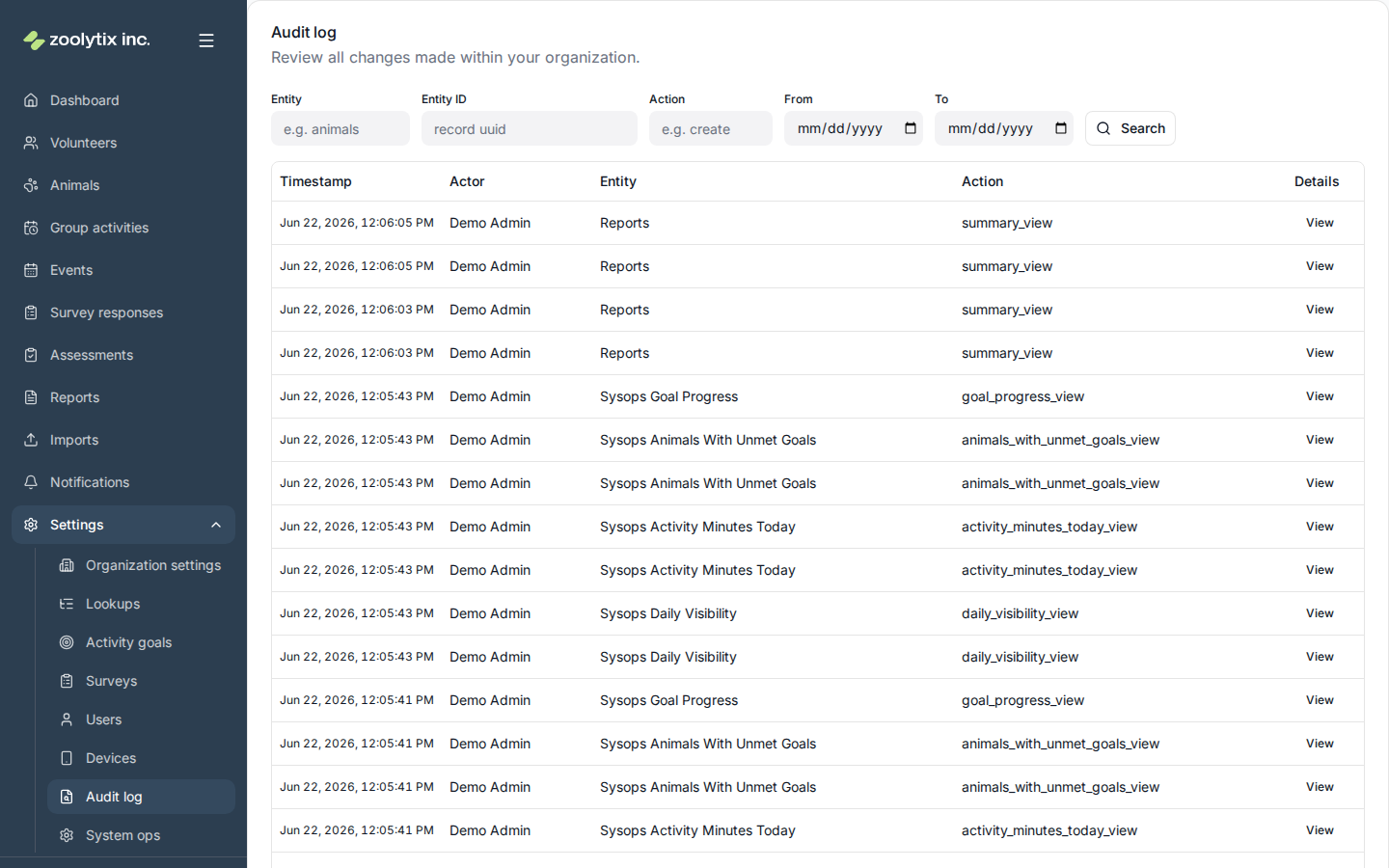
One record of what happened — and what went wrong.
An org-wide, time-ordered feed of important changes (who changed what, with a before/after view) alongside sign-in and security events such as logins, password resets, lockouts, device approvals, and sessions ShelterSync ended early (with the reason) — including failures. Use it to answer 'who did this, and when?' and 'did anything go wrong?'. Filter by group, date, or failures only; open an entry to see the details. Sign-in & security events are visible to administrators, and so is 'Where it came from' on a change — the address, device and browser of the sign-in session behind it, with a link to the other changes made on that same session.
What you can do here
- Search by person (name or email), event type, or record kind
- Filter by group (e.g. Sign-in & security, Animals) or date
- Show only failures to spot lockouts and failed sign-ins
- See a person's full history from their user or volunteer page
- Open an entry to see the exact change or event detail
- Open a change and follow 'Show everything from this session' to see the other changes made on it (sign-in & security events are hidden while that filter is on)
Find what happened
Use the filters to narrow the feed:
- Search — type a person's name or email, an event type ("password reset"), or a record kind ("animals") to match across those fields. (It searches the people and labels on each entry, not the values buried inside a change's before/after detail.)
- Group — focus on one kind of activity, such as Sign-in & security, Animals, or Activities & events.
- From / To — limit to a date range (up to 90 days).
- Failures only — show just the things that didn't succeed (failed sign-ins, lockouts, denied devices) so problems stand out.
To see everything for one person, open their profile from Users (or Volunteers) and choose View full activity log — that lands here pre-filtered to that person.
Click any entry's View to see the full detail — for a change, the old and new values; for a security event, the surrounding context.
Where a change came from
Open a change and, if you're an administrator, you'll see Where it came from: the address, device and browser of the sign-in session the change was made on. Show everything from this session then filters the feed to the other changes made on that same sign-in — useful when you're following one afternoon's work, or one account you're not sure about. While that filter is on the feed shows changes only: sign-in & security events carry no session of their own to match against, so they are hidden rather than left in unfiltered. Clear the filter to get them back.
Two things it can say instead:
- "No sign-in session recorded" — either ShelterSync itself made the change (a scheduled job or a connected system, rather than a person at a keyboard), or the change was made before this feature shipped. An import you run is not one of these — it's made on your sign-in, so its changes name your session. An automatic sync from a connected system is, because nobody is signed in when it runs. Older entries are not filled in after the fact: the session behind a change made last year cannot be worked out honestly, and a guess in an audit log is worse than a blank. The entry's own description says what kind of change it was.
- "The sign-in session … has since been removed" — the change was made by a person on a session that has since been cleared away. The entry still records that a session made it; the address and device are simply no longer held.
When a session ends early
ShelterSync ends a person's sign-in session early in several situations, and the log records each one. Some are recorded by the entry for the action itself:
- A sign-out shows as Logout.
- When an administrator denies or revokes a phone or browser, Device denied or Device revoked stands for the session of the person it was done for. Anyone else signed in on the same shared phone gets a Session ended entry of their own.
- A password change shows as Password changed at the shelter where it was made.
- Setting a new password from a reset or invite email shows as Password reset completed at the shelter the email came from.
- ShelterSync support removing someone from your shelter shows as Membership removed.
Every other early ending shows as Session ended: one entry per session, in the log of the shelter the session was at, naming the person. Open it to see the reason:
device_denied: your shelter denied or revoked the phone or browser the session was on.deletion_requested: the person asked for their account, or their membership of your shelter, to be deleted.deletion_confirmed: a deletion request was confirmed.organization_deactivated: your shelter was deactivated.account_disabled: ShelterSync support disabled the account.credentials_changed: the person's password was changed.platform_revoked: ShelterSync support signed the person out everywhere.mfa_reset: ShelterSync support reset the person's two-step verification, which signs them out everywhere.
A session that runs out of time, or is left idle too long, ends by itself and gets no entry. Nothing that happens afterwards records it or counts it as ended, including signing out of it.
Who can see security events
The sign-in & security half of the feed contains sensitive information (such as failed sign-ins and IP addresses), so it's shown to administrators only. Other roles with audit access still see the record-change half; the security events are simply hidden from their view. Where it came from is part of that same half — an administrator sees it; other roles with audit access don't.
Fields explained
| Field | What it means |
|---|---|
| Where it came from | The sign-in session that made the change, with its address, device and browser. Administrators only. 'No sign-in session recorded' means either ShelterSync itself made the change — a scheduled job or a connected system — or the change predates ShelterSync recording this; changes are not backfilled, because the session behind an old change cannot be worked out honestly. An import someone runs is made on their sign-in and does name their session; an automatic sync from a connected system does not, because nobody is signed in when it runs. |
TIP
The log is read-only — ShelterSync gives nobody a way to edit or delete an entry. There are three exceptions. A deletion request reduces the details of entries about the person leaving to field names, while the person who acted, what they did, when, and the session it came from all stay. Removing an organization takes its entries with it — whole organization or nothing; there is no way to remove one entry. And sign-in & security events (sign-ins, failed attempts, codes, lockouts) are removed twelve months after they happen, as the privacy policy says; changes to your records, including changes to accounts, roles and devices, are not. That's what makes the log trustworthy.