Appearance
Reports
Reports turn your shelter's day-to-day data into summaries you can read, compare over time, and export to a spreadsheet.
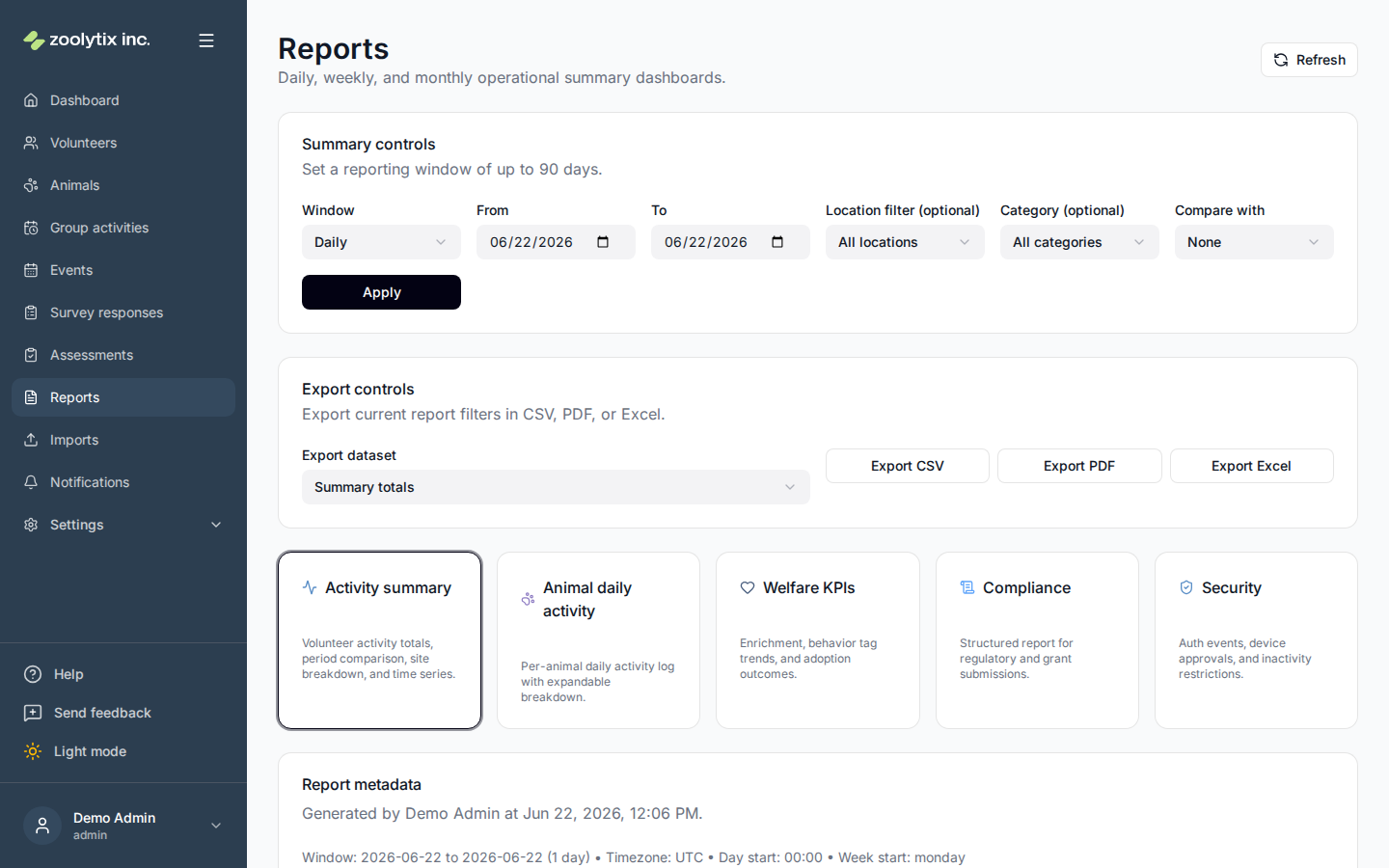
Who can use this page: staff and administrators with reporting access. The Security report is for administrators only: it also needs the permission to see sign-in and security events, which only administrators hold by default. Anyone without it doesn't see Security in the list of reports, and a link straight to it shows Access restricted.
The report types
Pick a report type, choose a date range, and narrow by location or category if you need to. The date range starts on your shelter's today — the current date in the reporting timezone an administrator sets in Organization settings, rather than your computer's, so someone working from another timezone opens the same day the shelter is on. Every report here, and the Compare with panel on the Activity summary, judges the day boundary in that same timezone and at your reporting day start, so an evening session lands on the day it happened for your shelter, not on the next day's row, and the summary and its comparison agree on which day a session belongs to. On the Welfare indicators report, the Compliance report and the Compare with panel, an animal's outcome counts on the outcome date written on its record.
- Activity summary — how much activity happened over a period: counts by category, type, and who performed them. Good for "how much enrichment did we do last week?"
- Animal daily activity — activity minutes per animal per day, so you can see which animals are getting attention — and, in its own section, which are being missed (see below). Search it by animal name or by the ZSS identifier printed on the kennel card.
- Welfare indicators — the welfare-focused numbers: how animals are tracking against goals, what's on hold, and behavior or medical flags. Enrichment participation is the share of animals in care that had at least one interaction in your Enrichment activity category during the window; the tile shows both numbers so you can check it — export the interaction detail for the same window, keep the Enrichment rows whose Animal In Care column says yes, and count the distinct animals among them. If your shelter has no activity category named Enrichment, the tile says so rather than showing a figure.
- Compliance — a record-keeping view of important actions (offboards, transfers, and other sensitive changes) for accountability.
- Security (administrators only) — sign-in and access events: failed logins, device approvals, lockouts, and similar, plus inactivity restrictions. It names people: whose phones and browsers are waiting for approval or were approved, denied or revoked, and which volunteers were restricted for inactivity.
Animals with no activity
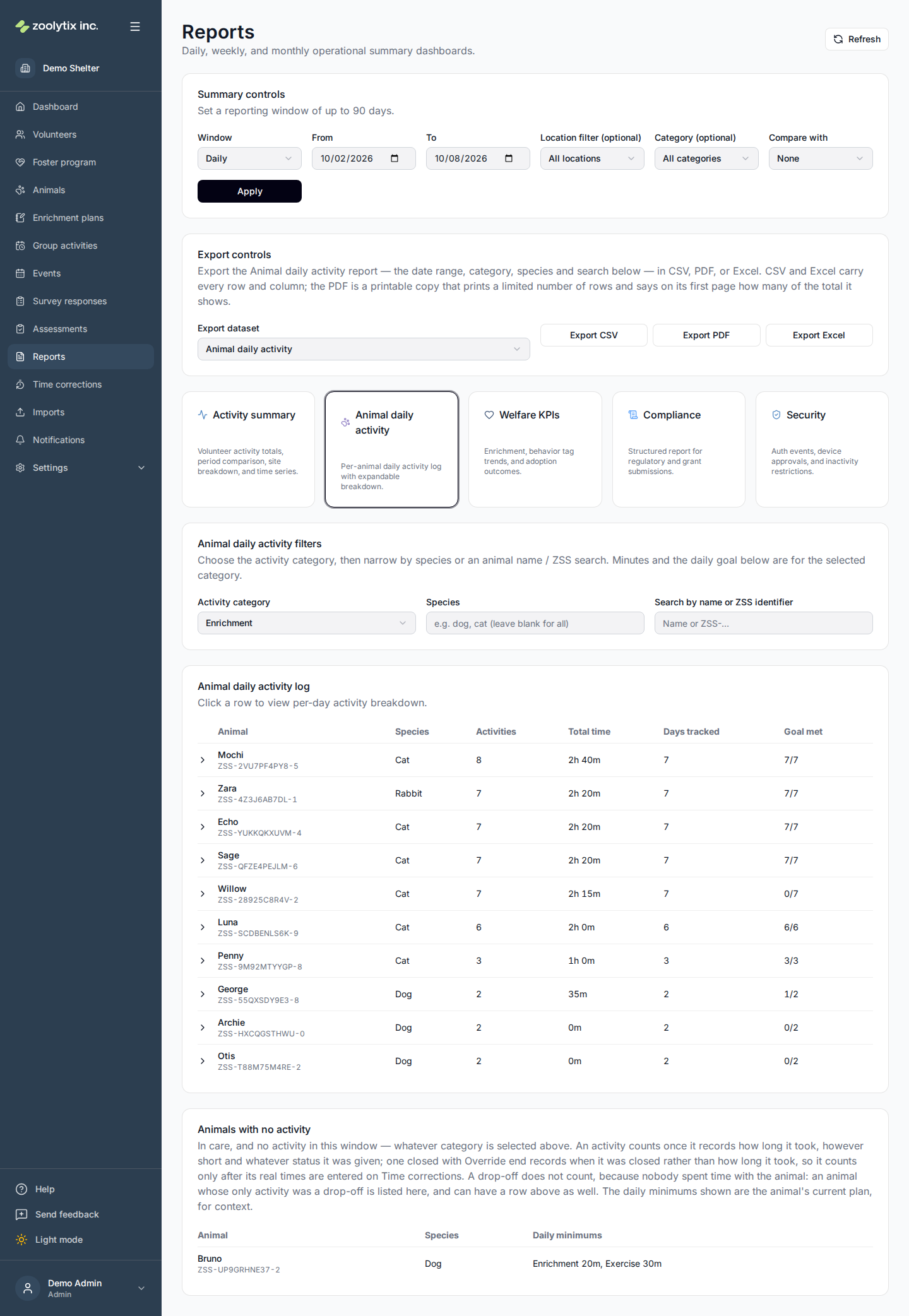
A row is only drawn above for an animal that logged something in the category picked, which is the opposite of what a report about being missed needs. So below the rows, the Animal daily activity report always lists the animals in care with no activity in the window — a drop-off does not count, as explained below. There is no switch for it; the missed animals are the point of the report.
The section ignores the category picker on purpose — an animal that had activity in another category was not missed — while the species picker and the search box narrow it as they narrow the rows. A session of any length counts as activity, and the status it was given makes no difference; an activity closed with Override end counts only after its real times are entered on Time corrections, which is the same rule the rows above are read over (which activities count) — so an animal with a row above is not also in this list, with one exception. A drop-off is drawn as a row above like any activity, but nobody spent time with the animal, so it does not count as activity here: an animal whose only activity in the window was a drop-off is in this list, and also above when the drop-off's category is the one picked. Each row shows the animal's species and its current daily minimums, for context, or No plan; the plan plays no part in who is listed.
It is the same reading the dashboard's Animals being missed card makes for today, judged over the same reporting day, so for a one-day window ending today the two name the same animals.
Downloading the Animal daily activity report
With the Animal daily activity tab open, the Export controls card offers the report itself as CSV, PDF, or Excel. The download carries the date range from the header plus the tab's own category, species and search, so its rows are the rows you were reading:
- One row per animal per day, with Row Type
activity: the day's activities, its Minutes (rounded up once), the Goal Credit Minutes the daily target is measured against, the target, and whether the day met it. Duration Milliseconds is that animal's exact total for that day, across however many sessions it had, for reconciling. - Then one row per animal in the Animals with no activity section, with Row Type
no_activity, its current Daily Minimums (orNo plan), and Activities reading0. Those rows have no day to describe, so Category, Date, Minutes, Goal Credit Minutes, Daily Target Minutes, Met Goal and Duration Milliseconds are all empty on them. More generally, a cell is left empty wherever its value does not apply, on either row type: an animal with no daily minimum has no Met Goal, an animal with no ZSS identifier has none printed, and anactivityrow never carries Daily Minimums. So a column averaged over the whole file is not an average over every animal — check which rows actually carry the column before you total it.
The header's location filter does not apply to this report and is not part of its download. The file name carries the report and the date range.
Reading and exporting
The summary cards at the top give you the headline numbers for the period you've chosen; the table below breaks them down. When you've got the view you want, export to CSV, PDF, or Excel to share it or keep a copy.
On the Activity summary, an export carries the filters in the header above the report — the date range, location, and category — so the rows in the download match the totals you were reading. On the Animal daily activity tab the download is the report itself, with the tab's own pickers applied (see above). The other report types have no download.
Two of the downloads carry a Duration Milliseconds column alongside the rounded minutes — the interaction detail and the Animal daily activity report. It holds thousandths of a second, which is why it reads as a large whole number: 40900 is 40.9 seconds. Like the activity minutes on screen, it leaves out any time an activity was paused, so a session's value can be shorter than the gap between its Started At and Ended At. Reconcile from the CSV or the Excel file.
What that column measures depends on which download you took. In the interaction detail it is one session's length, and that download alone carries an Animal In Care column, a Drop-off column and a Survey Asked column (each yes or no) — see Drop-offs and Pending survey activities below. In the Animal daily activity download it is an animal's total for one day, and it is empty on the no_activity rows, which have no minutes to reconcile.
The PDF is a printable copy, not the file to add up. It prints a limited number of rows, and its first page says how many of the total it shows — "Showing the first … of … rows" — so a long report can never look complete when it is not. A table too wide for the page is printed in column groups, each repeating the row number in its first column so a row can be followed from one group to the next, and every column is printed in some group. A value too long for its column is shortened to end in three dots, and the first page says how many values were. Use CSV or Excel for anything you need to reconcile.
Every total in ShelterSync is rounded up to the next whole minute once, over that total's own span — a day total over its day, a window total over its window, never once per session. Because each figure is rounded on its own, separate figures do not add up to one another, and the difference grows with the number of rows: thirty daily rows of one 40-second session each read 1 minute and sum to 30, while the window covering them reads 20. Neither is wrong, and neither is a rounding error to chase — to reconcile a figure exactly, add up the Duration Milliseconds column, divide by 60000, and round up to the next whole minute, rather than adding up the rounded minutes.
Which activities count
Every figure that totals activity minutes — the Activity summary and its site and day breakdowns, the Animal daily activity report, the downloads, the dashboard's Activity minutes today, goal progress, volunteer weekly totals and the volunteer leaderboard — counts the same activities: the ones whose length someone observed. An activity's end time is normally the moment the person running it tapped End. When someone else closes a stuck activity with Override end, the end time recorded is the moment they closed it, not when the activity finished, so its length is not a measurement and it is left out of every figure until someone enters its real times on Time corrections. Once corrected, it counts everywhere, in the corrected amount. Whether the closer marked it Completed or Abandoned makes no difference either way; and an activity the volunteer themselves ended as Abandoned was observed, so its minutes count.
The rows in the downloads leave out the same uncorrected activities, which is what keeps the reconciliation above exact — and the Activity summary's activity and survey counts are read from those same rows, so an activity waiting on a correction is missing from Total interactions, from the breakdowns, from the Compare with panel and from the survey figures beside them, and returns to all of them when it is corrected. Safety alerts and animal outcomes are counted as before: an alert someone raised happened whatever the recorded clock says.
The first time this rule applies, figures move in both directions. A figure drops by the minutes of the activities waiting on that page that it used to count — the Activity summary and its downloads counted all of them, the other figures only the ones marked Completed — and rises again as they are corrected. And the dashboard's Activity minutes today, goal progress, the Animal daily activity report, volunteer weekly totals and the leaderboard, which until now counted only activities marked Completed, now also count one the volunteer ended as Abandoned, so they read higher by those minutes; the Activity summary and its downloads already counted those.
Drop-offs
A drop-off — something left in the kennel and logged as done, with no timer — has no length, so it adds no minutes to any activity total: not the Activity summary, not the Animal daily activity report's time, not the downloads' Duration Milliseconds, not the dashboard's Activity minutes today, not volunteer weekly totals or the leaderboard. It still counts as an activity in the Activity summary's counts and the Compliance report's Activities completed. It is not volunteer time, so logging one does not on its own count someone among the Activity summary's Active users. A drop-off never asks a survey, so it is never counted in the Activity summary's Pending survey activities, and its row in the interaction detail download reads yes in the Drop-off column and no in Survey Asked.
What it does count toward is goal progress: each drop-off counts the Typical minutes set for its activity, taken when it was logged, toward the animal's daily target in its category. The target itself does not change. So on the Animal daily activity report a day can read less time than the minutes counted toward its goal, and still show as met.
Pending survey activities
The Activity summary's Pending survey activities counts the activities in the window that were asked a survey and have none completed yet. An activity is asked a survey when its activity type has an active activity survey connected at the moment the activity is started, or logged afterwards as a past session; a survey set to First-time survey only is skipped when that volunteer already has a first-time survey with that animal, filled in or still waiting. An activity asked none — its type had no active survey connected then, or only a first-time survey that was skipped — is not waiting for a survey, so it is not counted; nor is a drop-off, which never asks one. Abandoning an activity, or closing it with Override end, closes any survey still waiting on it, and a closed survey counts as done here and in Surveys Completed, so that activity is not counted either.
To reproduce the figure, download the interaction detail for the same window and filters and count the rows whose Row Type is activity, whose Survey Asked is yes and whose Surveys Completed is 0.
Fields explained
| Field | What it means |
|---|---|
| From | The first day the report covers. It starts on your shelter's today — the current date in your organization's reporting timezone, which an administrator sets in Organization settings, rather than your computer's, so someone working from another timezone opens the same day the shelter is on. Every report here, and the Compare with panel on the Activity summary, judges the day boundary in that same timezone and at your reporting day start, so an evening session lands on the day it happened for your shelter, and the summary and its comparison agree on which day a session belongs to. On the Welfare indicators report, the Compliance report and the Compare with panel, an animal's outcome counts on the outcome date written on its record. |
| To | The last day the report covers. A window can span at most 90 days. |
| Activity minutes | Every total is rounded up to the next whole minute once, over that total's own span — a day total over its day, a window total over its window, never once per session. Because each figure is rounded on its own, smaller figures do not add up to a larger one covering the same time, and the difference grows with the number of rows you are adding: thirty daily rows of a 40-second session each read 1 minute and sum to 30, while the window they cover is 20. Neither figure is wrong; do not add rows up to check a total. To reconcile exactly, export the interaction detail and use its Duration Milliseconds column: add those up, divide by 60000, and round up to the next whole minute. That column holds each session's length in thousandths of a second, which is why it reads as a large whole number — 40900 is a 40.9-second session — and why adding it up gives back the figure on screen every time. It leaves out any time the activity was paused, as the activity minutes on screen do, so it can be shorter than the gap between the session's start and end times. Goal progress is measured differently on purpose: it counts only whole minutes actually spent, so a session under a minute adds nothing toward a daily target, and a day can read above its target and still show as below goal. A drop-off — something left in the kennel and logged as done, with no timer — works the other way round: it adds no minutes to any activity total, because nobody's time was measured, but it counts the Typical minutes set for its activity toward goal progress, so a day can read below its target and still show as met. Drop-offs are still counted as activities, in the Activity summary's counts and the Compliance report's activities completed, but they are not volunteer time: on the Activity summary, logging a drop-off does not on its own count someone among the Active users. A drop-off never asks a survey, so it is never counted in Pending survey activities either. Every figure that totals activity minutes counts only activities whose length someone observed: an activity closed with Override end records the moment it was closed rather than when it finished, so its minutes are left out — of the Activity summary, the Animal daily activity report, the downloads, the dashboard and goal progress alike, whether it was marked completed or abandoned — until its real times are entered on the Time corrections page, and then they count everywhere in the corrected amount. The rows in the downloads leave out the same activities, which is why adding up their Duration Milliseconds still gives back the figure on screen. The Activity summary's activity and survey counts are read from those same rows, so an activity waiting on a correction is missing from its totals, its breakdowns and the Compare with panel beside them as well as from its minutes, and returns to all of them when it is corrected. Safety alerts and animal outcomes are counted as before: an alert someone raised happened whatever the recorded clock says. |
| Pending survey activities | On the Activity summary, the activities in the window that were asked a survey and have none completed yet. An activity is asked a survey when its activity type has an active activity survey connected at the moment the activity is started, or logged afterwards as a past session; a survey set to First-time survey only is skipped when that volunteer already has a first-time survey with that animal, filled in or still waiting. An activity asked none — its type had no active survey connected then, or only a first-time survey that was skipped — is not waiting for a survey, so it is not counted; nor is a drop-off, which never asks one. Abandoning an activity, or closing it with Override end, closes any survey still waiting on it, and a closed survey counts as done here and in Surveys Completed, so that activity is not counted either. To check the figure, export the interaction detail for the same window and count the rows whose Row Type is activity, whose Survey Asked column says yes and whose Surveys Completed is 0. |
| Export current report filters | On the Activity summary, the download carries the filters in the header above it — the date range, location, and category — so its rows match the totals you were reading. On the Animal daily activity report, the download is the report itself: it carries the date range plus the tab's own category, species and search, so the rows match the screen, and it includes the Animals with no activity section as its own rows (Row Type is no_activity). The header's location filter does not apply to that report and is not part of its download. Reconcile a total using the CSV or Excel download and its Duration Milliseconds column: add it up, divide by 60000 and round up, and you get back the figure on screen. On the interaction detail that column holds one session's length; on the Animal daily activity report it holds an animal's total for one day, and it is empty on the Animals-with-no-activity rows, which have no minutes to reconcile. The PDF is a printable copy, not the file to add up: it prints a limited number of rows and says on its first page how many of the total it shows; a table too wide for the page is printed in column groups, each repeating the row number so a row can be followed across them; and a value too long for its column is shortened to end in three dots, with a note on the first page saying how many were. |
| Enrichment participation | On the Welfare indicators report, the share of animals in care that had at least one interaction in your Enrichment activity category during the report window. The label shows both numbers so you can check it: export the interaction detail for the same window, keep the Enrichment rows whose Animal In Care column says yes, and count the distinct animals among them. It reads Not available if your shelter has no activity category named Enrichment. |
| Animals with no activity | Below the activity rows, the Animal daily activity report always lists the animals in care with no activity in the window — the animals being missed, which the rows above cannot show, because a row is only drawn for an animal that logged something in the category picked. It ignores the category picker on purpose: an animal that had activity in another category was not missed. The species picker and the search box narrow it as they narrow the rows. A session of any length counts as activity, and the status it was given makes no difference; an activity closed with Override end records when it was closed rather than how long it took, so it counts only after its real times are entered on Time corrections — which is the one rule the rows above and this list are both read over. A drop-off is the exception: it is drawn as a row above like any activity, but nobody spent time with the animal, so it does not count as activity here. An animal whose only activity in the window was a drop-off is listed here, and also above when the drop-off's category is the one picked. Apart from that, an animal with a row above is never also listed here. Each row shows the animal's current daily minimums for context, or No plan; the plan plays no part in who is listed. It is the same reading the dashboard's Animals being missed card makes for today, judged over the same reporting day, so for a one-day window ending today the two name the same animals. |
| Search by name or ZSS identifier | On the Animal daily activity report, narrows the list to animals whose name or ZSS identifier matches what you type. The ZSS identifier is the code printed on the animal's kennel card. |