Appearance
ShelterSync SMS opt-in — the live consent screen
ShelterSync is operated by Zoolytix Inc. (zoolytix.com). This page shows the actual, live SMS consent experience exactly as it appears to users inside the ShelterSync application (app.mysheltersync.com).
See the live consent form
The consent control itself is publicly viewable, with no login and no browser challenge, at:
https://app.mysheltersync.com/sms-opt-in
That page renders the same consent component the application uses — the consent checkbox with the full disclosure, the action button that stays disabled until the box is checked, and the SMS Terms and Privacy Policy links — and hands off to sign-in, where enrollment completes on the Profile & security page shown below.
This is the complete public opt-in page as served at that URL (ShelterSync branding, operator identity, the standalone consent checkbox, and all disclosures on one screen):
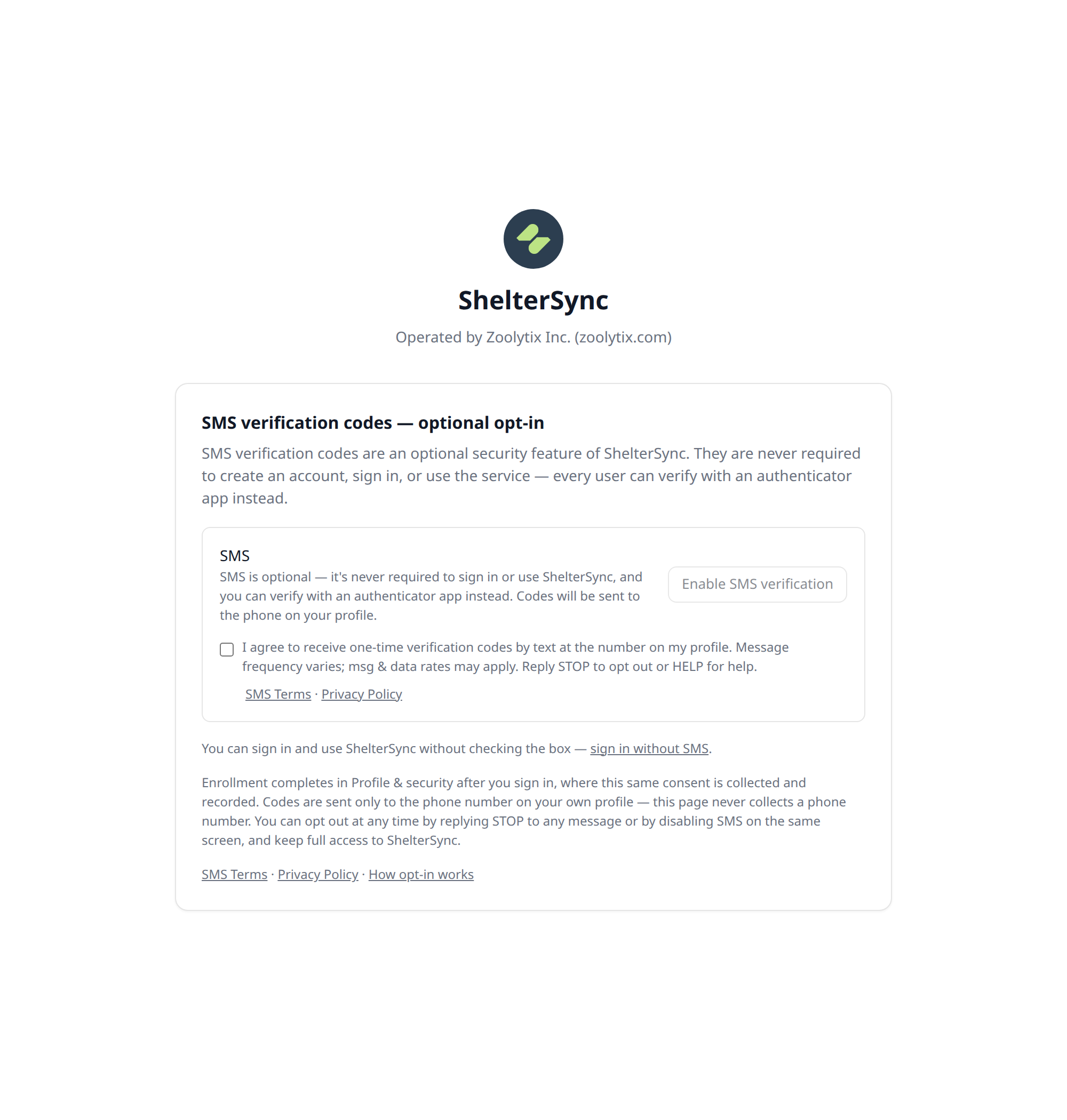
The consent screen
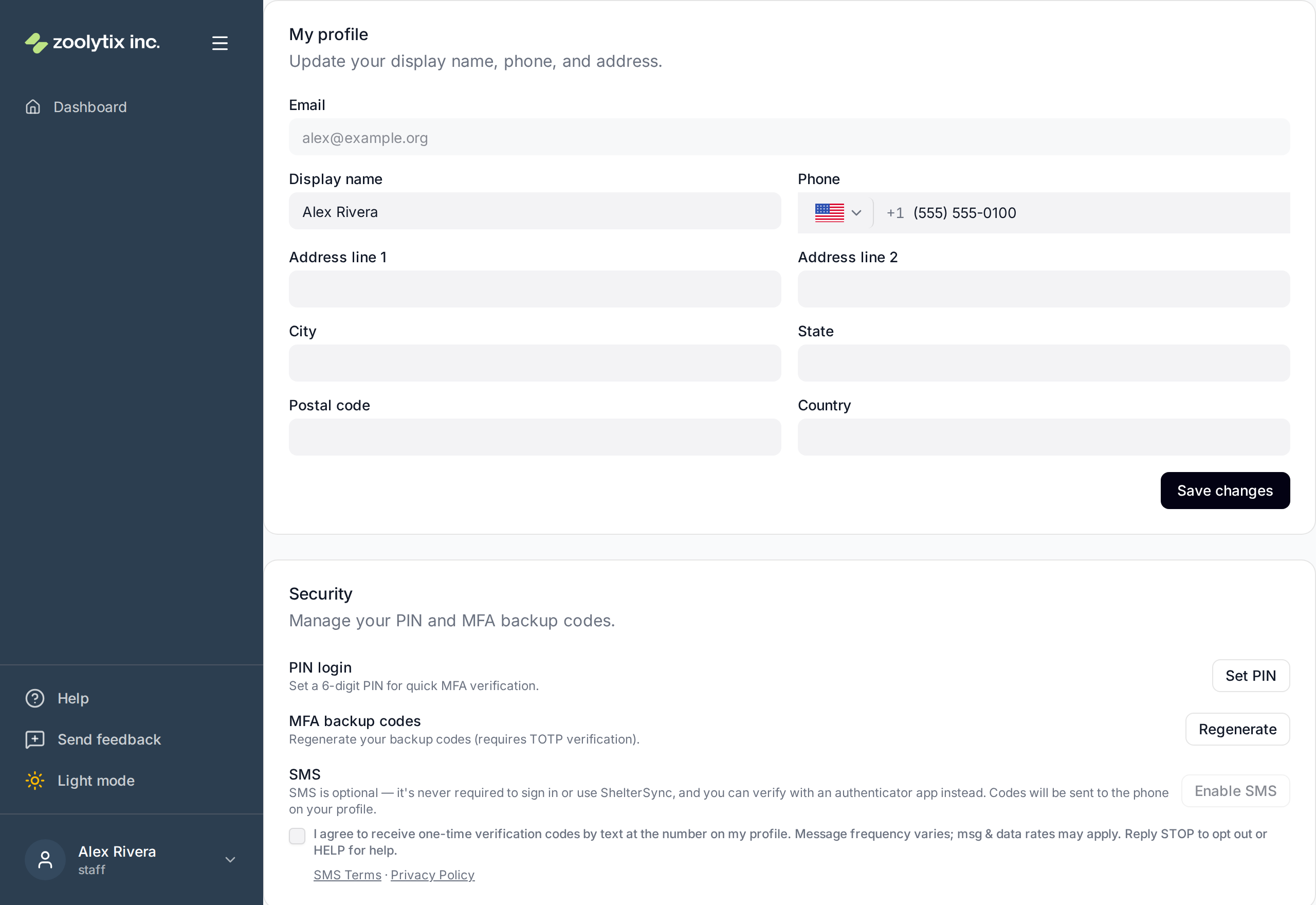
SMS consent is collected on the Profile & security page, at the moment the user chooses to turn on SMS verification codes. The user must check a consent box agreeing to the terms — the Enable SMS button stays disabled until the box is checked. This is the live opt-in control and the consent checkbox shown beside it:

Directly above the checkbox, the SMS section states, verbatim:
SMS is optional — it's never required to sign in or use ShelterSync, and you can verify with an authenticator app instead. Codes will be sent to the phone on your profile.
And the consent checkbox label shown to every user at this step, verbatim:
I agree to receive one-time verification codes by text at the number on my profile. Message frequency varies; msg & data rates may apply. Reply STOP to opt out or HELP for help.
The checkbox covers only consent to receive the verification texts. The SMS Terms and Privacy Policy are presented as standalone links directly beneath the checkbox, at the moment consent is collected.
Each acknowledgement is recorded: checking the box and proceeding stamps a consent timestamp on the user's account and writes a sms_consent_acknowledged entry (with the consent-text version) to the security event log, so every opt-in is provable after the fact. The consent requirement is enforced server-side — enrollment is rejected without the acknowledgement.
The SMS Terms and Privacy Policy links above are the same links presented to the user on the consent screen, at the moment consent is collected.
The screen in context
The same consent panel shown within the full ShelterSync application (Zoolytix branding visible, Profile & security page):
Consent is optional and separate from the service
- Enabling SMS is never required to create an account, sign in, or use ShelterSync. The SMS panel is an optional toggle inside account settings — it is not part of registration, purchase, or any required flow.
- A user who never enables SMS has full, unrestricted access to ShelterSync, using an authenticator app (TOTP) or email verification codes instead.
- No user is enrolled automatically. Consent requires the user to check the consent box, click Enable SMS, and then confirm a one-time code sent to their phone (double opt-in with a recorded acknowledgement).
- Users can withdraw consent at any time — by replying STOP to any message, or by disabling SMS on the same Profile & security screen — and continue using ShelterSync fully.
What the user receives after opting in
Only one-time verification codes for account security (sign-in verification and two-factor authentication), matching the consent language above. Example message:
Your ShelterSync verification code is 123456. It expires in 10 minutes.
No marketing or promotional messages are sent. Message frequency depends on the user's own sign-in activity.
Related pages
- SMS Terms & Consent — full program terms (opt-in, opt-out, frequency, cost, carriers)
- Privacy Policy — Zoolytix Inc. privacy policy covering ShelterSync